
 Download App
Step 1: decide who the community is for
An online community that serves "everyone interested in marketing" serves nobody. Members join because they expect to meet people like them, with the same problems this month.
Write one sentence that names the member, the shared problem and what they get from each other. If you can't write it, you aren't ready to invite anyone.
A community for [who, specifically]
who [shared situation or goal],
where members [what they do together: weekly calls, reviews, intros],
so they can [the outcome they care about].

Example:
A community for independent product designers
who sell their own services,
where members review each other's proposals and meet every Tuesday,
so they can raise their rates without guessing.
Keep the example in front of you. Every later decision (the platform, the rituals, the price) should make sense for that one person.
Step 2: pick the platform your members already use
The most common mistake when people build an online community is asking members to install something new. Every extra app is a reason to drift away after week 2.
If your audience already lives in Telegram, start there. If they live in Slack at work all day, a Slack workspace may be the better home. Gamers and creators often expect Discord. Choose by habit, not by feature list.
Chat apps
Telegram, WhatsApp, Slack, Discord. Members are already there, notifications work, and the barrier to join is a single link. The weak spot is memory: good answers scroll away.
All-in-one platforms
Circle, Skool, Mighty Networks. Feed, courses and events in one place, with payments built in. Members have to adopt a new site or app and come back to it.
Chat plus a content layer
Keep the conversation in the chat and put the materials in a library that opens from it. This is the setup this guide assumes.
For a deeper look at the options, see the best community platforms compared, Telegram vs WhatsApp for communities and Discord alternatives.
Step 3: get your first 50 members by hand
The first 50 members set the tone for the next 500. They decide whether the chat feels like a room of peers or a broadcast channel with comments. So pick them one by one.
List 30 people you would want in the room
Past clients, colleagues, people who reply to your posts. Write their names down. If you can't reach 30, narrow the audience until you can.
Invite them personally
A direct message with the one-sentence definition and the date of the first call. No landing page yet. Personal invites convert far better than a public post, and you learn why people say no.
Ask each one to bring one person
The second wave comes from the first. "Who else should be here?" gets you people you would never have found, with a built-in introduction.
Introduce every new member
A short post: who they are, what they work on, what they can help with. It takes 2 minutes and it's the single best way to make a newcomer speak in their first week.
Open the door wider only after the habits stick
Once people show up to calls without reminders and answer each other without you, it's time for a public page and a waiting list.
Step 4: set a weekly ritual
A community is a habit before it's a network. The easiest habit to build is one recurring event at the same time every week.
For a professional club, that's usually a call: a guest expert, a member case review, or open office hours. Pick one format and keep it for at least 8 weeks before you change anything.
- Weekly call. Same day, same time, same link. 45 to 60 minutes. Start on time even if 4 people are there.
- Monday prompt. One question in the chat that anyone can answer in a sentence: "What are you shipping this week?"
- Friday wins. Members post one result. Short, specific, celebrated.
- Monthly guest. Someone from outside the group, with a deck and a Q&A. This is what members forward to friends.
- Quarterly review. Ask members what to keep and what to drop. Then actually drop something.
Members forgive a small community. They don't forgive an unpredictable one. Show up at the same time every week.
Step 5: record and archive from day 1
This is the step almost everyone skips, and the one that decides whether your online community gets more valuable over time or just older.
Picture month 6. A new member asks how others handle late-paying clients. Someone remembers a great call about it "in spring, maybe April". The recording is a Zoom link in a message nobody can find. The answer is lost, and the new member wonders what they're paying for.
Without an archive
- Recordings are links in the chat, buried after a week
- Slides sit in someone's Google Drive
- New members ask questions answered 3 months ago
- The best material is invisible to anyone who joined late
- The admin re-posts the same links every few days
With an archive from day 1
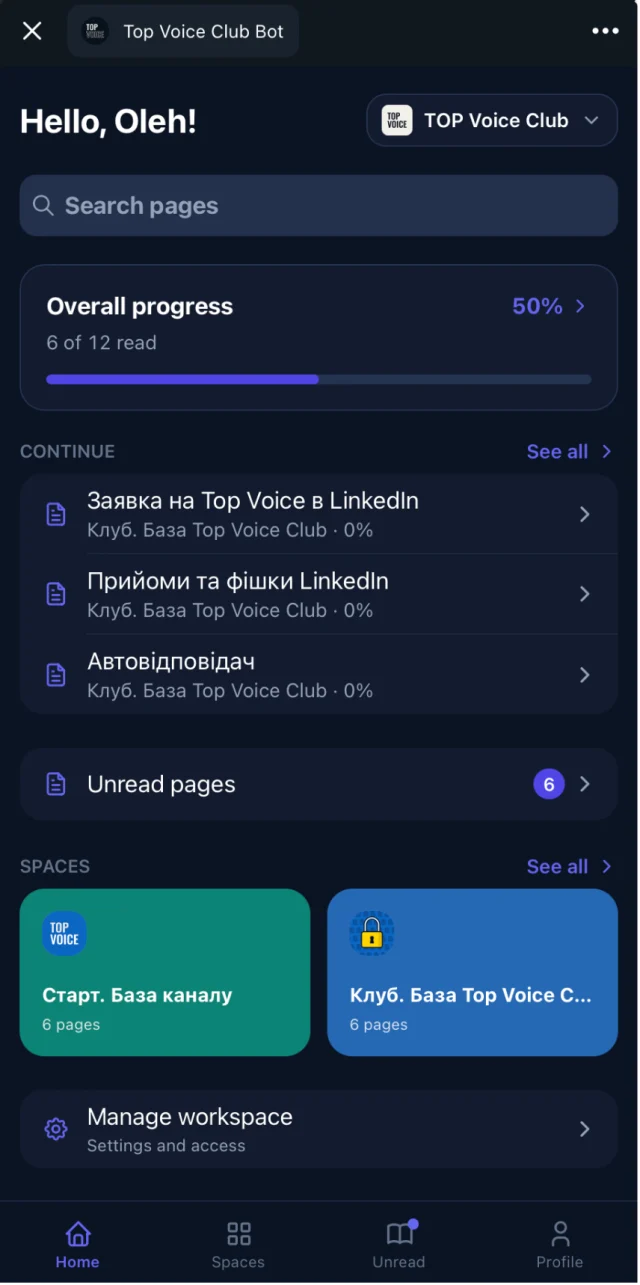
- Every call is a page: video, transcript, summary and deck
- Search finds the answer by meaning, not only by exact title
- New members binge the best 10 sessions in their first week
- The library grows into the main reason to stay
- The admin shares one link instead of twenty
You don't need a perfect system. After each call, upload the recording (YouTube unlisted or Vimeo works), add the deck, and write 3 lines on what was covered. Do it within 24 hours, while you still remember the best moment.
A tool helps here. In Embedify, a YouTube or Vimeo video on a page gets a transcript and an AI summary, so a member can skim a 90-minute call in 2 minutes. More on this in the webinar recording library.
Step 6: write the onboarding doc
Every new member arrives with the same 5 questions. Answer them once, on one page, and pin the link. Call it "Start here".
Welcome to [community name]

1. Who this is for (the one-sentence definition)
2. How the week works
   - Tuesday 18:00: weekly call (link)
   - Monday: prompt in the chat
   - Friday: wins thread
3. House rules (5 at most)
4. Where things live
   - Chat: questions and conversation
   - Library: recordings, templates, guides
5. Your first week
   - Introduce yourself in the chat
   - Watch these 3 recordings first: [links]
   - Come to one call
6. Who to ask: admin contacts
Keep it short enough to read in 3 minutes. If a rule needs a paragraph to explain, it probably belongs in a separate FAQ page.
Step 7: add a paid tier
Charging money changes who joins and how seriously they show up. Most groups that turn into a paid community do it after the free version has proven its value, usually once there's a habit of weekly calls and a library worth paying for.
A common shape for a membership community is a free tier that shows what you do, and a paid tier that gets the depth.
| Free tier | Paid tier | |
|---|---|---|
| Chat | Open group or channel | Private group |
| Calls | One open session a month | Every weekly call, live |
| Recordings | 2 or 3 best sessions as a sample | The full archive with summaries |
| Resources | Start here page, public guides | Templates, contracts, checklists |
| People | Read-only | Member directory and intros |
For payments in Telegram, paywall bots like Tribute and InviteMember handle subscriptions and let paying people into the private group. They don't host a knowledge base, so pair them with a library. See how Tribute, InviteMember and Embedify work together.
Step 8: measure community engagement that matters
Member counts and message counts are easy to track and easy to misread. A busy chat can be 3 people arguing. Watch the signals that tell you people get value.
- Call attendance as a share of members, week over week.
- First-week activity: did the new member introduce themselves and come to a call?
- Library use: who opened the Start here page, who finished the recordings you recommended.
- Member-to-member replies: questions answered by someone other than you.
- Renewals, once you have a paid tier. This is the honest score.
If attendance drops, change the time or the format before you add new things. If the library is unused, the problem is usually discovery: people don't know it exists or can't open it from where they are.
Where Embedify fits when you build an online community in Telegram
Embedify is the content layer for a community that talks in Telegram. The chat stays the chat. The library opens from it as a Telegram Mini App, so members never leave the app to find a recording.
Access follows the group
Members of your Telegram group get access automatically. When someone leaves, access goes with them.
Recordings people can skim
YouTube and Vimeo videos with a transcript and an AI summary on the page.
Search by meaning
Full-text plus semantic search, so "how do I price a project" finds the page called "Rate negotiation".
Free and paid spaces
Access groups decide who sees what: free tier, paid tier, mentors only.
Write in Google Docs
Import Google Docs and keep them in sync. Edit the doc, the page updates.
Your own bot
From $29/month on Basic, the library opens under your community's name and avatar.
The Free plan has no time limit and covers open content with unlimited readers, so you can start the archive with your very first call. Private access and your own bot start on Basic from $29/month; see pricing for Pro and Scale. For a broader case for the library itself, read why every community needs a knowledge base.