
 Download App
What it costs to run a community without one
Nobody decides to skip a community knowledge base. It just never gets built, because the chat seems to be working. The cost shows up in small moments, every week.
The question answered 40 times
A new member joins on Monday and asks how to get the recording of the onboarding call. Someone answers. On Thursday, another new member asks the same thing. Over a year, the same question gets answered dozens of times, by different people, with slightly different answers.
Each answer takes 2 minutes. The real cost is that the new member had to ask at all, and that the people answering are your most helpful members, the ones you least want to tire out.
The 90-minute session nobody can find
Your community hosted an expert for a 90-minute call. It was the best session of the quarter. The recording link went into the chat that evening.
Three weeks later, a member asks "didn't someone talk about pricing retainers?". Nobody remembers the date. The link is somewhere above 2,000 newer messages. The session might as well not have happened for anyone who missed it live.
Knowledge that can't be found is knowledge your community paid for twice.
The mentor who leaves
One experienced member answers half the technical questions. They know which tools work, which suppliers to avoid, how to handle the tricky client. Then they get busy, or move on. Everything they knew leaves with them, because none of it was ever written down outside a chat thread.
Admins as human search engines
In most communities, the admin is the search box. "Where's the template?" "What are the rules about posting jobs?" "When is the next call?" Every one of those messages pulls the admin away from the work that actually grows the community.
Knowledge in the chat
- Answers scroll away within days
- Recordings are a link in a message from last month
- New members ask, or stay quiet and confused
- The admin answers the same questions on repeat
- Expertise lives in a few people's heads
Knowledge in a community knowledge base
- Good answers are pages with clear titles
- Every session has a page, a summary and the deck
- New members read a "start here" page first
- The admin replies with a link
- Expertise is written down and stays
Why a community knowledge base matters for retention
Here's a hypothesis, not a statistic: members stay longer when they can get value from the community on their own schedule.
The reasoning is simple. A member who missed 3 live sessions in a row and can't find the recordings starts to feel they're paying for something they can't use. A member who can open the library on a Sunday evening, search "retainer pricing" and watch a 2-minute summary of the session they missed is getting value whether or not they were online.
We can't give you a number for this, and you should be wary of anyone who does without showing their data. You can test it in your own community: watch whether members who use the library ask fewer "where is" questions and renew more often.
What a community knowledge base holds
A community knowledge base is different from a company wiki. It's smaller and built around what members actually do: watch sessions, copy templates, ask questions. These are the 5 parts most communities need.
Session recordings
Every expert call, workshop and Q&A, with the date, the speaker, the slides and a short summary.
Templates and resources
The proposal, the checklist, the spreadsheet that members keep sharing in the chat.
Member answers
The best replies from the chat, turned into pages with titles people would search for.
Onboarding
Rules, how the community works, what to read first, who to ask. Community onboarding in one place.
Event archive
Past sessions grouped by topic or speaker, plus what's coming up next.
Some communities call this a community wiki. The name matters less than 2 properties: members can search it, and it stays in sync with membership, so people who join get in and people who leave don't keep access.
Start with 10 pages, not 200
The fastest way to kill a knowledge base project is to plan it as a big migration. You open Notion or a new tool, sketch 40 sections, and stall after 6 pages.
Start with the 10 questions your admins answer most. That's it. Those 10 pages will remove more repeated work than any perfect structure, because they answer what members already ask.
Search the chat
Scroll back a month, or search for "where", "how do I" and "link". Note each question that came up more than once.
Ask your admins
Each admin or moderator lists the 5 questions they're sick of answering. You'll see the overlap fast.
Pick the top 10
Rank by how often they come up. Recordings, rules and "how do I join the call" usually win.
Write one page per question
Title it the way members ask it. Put the answer in the first 2 lines. Link the recording or file below.
Answer with links from now on
Next time the question comes up, reply with the page. Members learn where to look within a few weeks.
A 30-minute starter structure
Here's a structure you can set up in half an hour. 5 sections, 10 pages, all of them answering something your members actually ask.
START HERE
  1. Welcome: what this community is and how it works
  2. Rules: what to post, what not to post
  3. How to join the live calls (link, schedule, time zone)

RECORDINGS
  4. All session recordings (one line per session: date, speaker, topic)
  5. The most useful session so far, with a summary

RESOURCES
  6. Templates members ask for most
  7. Tools and suppliers we recommend

FAQ
  8. Billing, renewal and how to cancel
  9. How to contact the admins

EVENTS
  10. Upcoming sessions and speakers
For a fuller version with 6 spaces and an access map for free, paid and mentor tiers, use the community knowledge base template.
| Minute | What you do |
|---|---|
| 0 to 5 | Create the 5 sections and name them |
| 5 to 15 | Paste existing text for rules, welcome and call details |
| 15 to 25 | Add recording links you already have, one line each |
| 25 to 30 | Pin the link in the chat and tell members it exists |
Community onboarding that answers day-1 questions
Member onboarding is where a knowledge base pays back first. A new member is motivated and full of questions. If the answers are one tap away, they settle in without needing anyone's time.
A good "start here" page answers 4 things: what this community is for, how it works week to week, what to read or watch first, and who to ask when stuck. Keep it to one screen on a phone.
Where to keep it: next to the conversation
The best knowledge sharing platform for a community is the one members reach without leaving where they already talk. Every extra login and every jump to another site loses some readers.
If your community runs in Telegram, that's the gap Embedify fills. The knowledge base opens as a Mini App inside Telegram. Members of the connected group get access automatically, and lose it when they leave. Search covers pages, decks and the transcripts of every recorded session.
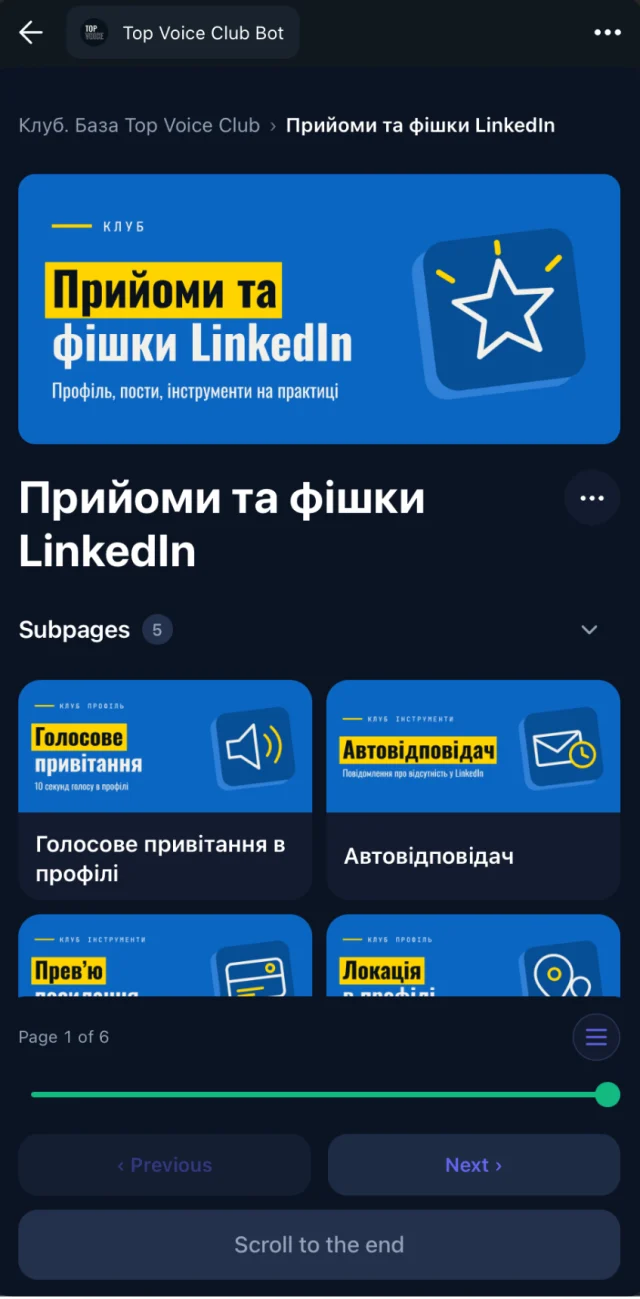
You can start on the Free plan ($0, no time limit) and add your own branded bot from $29/month on Basic. See pricing for Pro and Scale. More on how it works: Telegram knowledge base and the webinar recording library.
If your community lives somewhere else, the advice above still holds. Pick the tool your members already open, and start with 10 pages. For a broader look at the term itself, read what is a knowledge base.