
 Download App
What is a knowledge base, in plain words
A knowledge base is a collection of written answers, guides and reference material, organised so people can find what they need without asking someone. The point is reuse: you write the answer once, and everyone who has the same question later reads it instead of starting a new conversation.
That's the whole idea. The software, the templates and the AI features all serve that one job: get the right answer in front of the right person at the moment they need it.
A knowledge base is the answer you only have to give once.
A knowledge base differs from a shared folder in 2 ways. It has structure, so a reader can browse by topic. And it has search, so a reader can type a question and land on the page that answers it. A folder full of files named "final_v3" has neither.
It also differs from a chat. A chat is great for conversation, but answers scroll away. A knowledge base keeps the good answers still, titled and findable.
The 4 types of knowledge base
Every knowledge base serves an audience. Who reads it decides what goes in, who writes it and how private it is. Here are the 4 types you'll come across.
Customer knowledge base
Also called a help center or self service knowledge base. Public articles that help customers use a product and fix problems without contacting support.
Internal knowledge base
A team wiki. Processes, policies, onboarding docs and how-tos that employees need to do their work. Usually private to the company.
Personal knowledge base
One person's notes, highlights and ideas, linked together. Built for your own memory and thinking, not for an audience.
Community knowledge base
The shared library of a club, school or professional community: session recordings, member answers, templates, rules and onboarding.
Customer knowledge base (help center)
This is the type most people picture. A customer lands on a help page, searches "reset password", reads a short article with screenshots, and never opens a ticket. Companies build a self service knowledge base because every answered question is one less conversation for the support team.
Typical articles: getting started, account and billing, troubleshooting, feature explanations, and a short FAQ.
Internal knowledge base (team wiki)
An internal knowledge base holds what a team knows about how it works. How we run a release. Who approves expenses. What to do on your first day. Without one, that knowledge sits in the heads of the people who've been around longest, and everyone else interrupts them.
Personal knowledge base
Writers, researchers and students keep notes in tools built for linking ideas. A personal knowledge base has an audience of one, so it can be messy and still work. Nobody else has to find anything in it.
Community knowledge base
This is the newest type and the one most guides skip. A paid club, a mastermind or an online school produces a lot of knowledge: expert sessions, answers in the chat, templates members share, rules and introductions. A community knowledge base collects that into one library members can search. We cover it in depth further down.
Knowledge base examples
Here are knowledge base examples for each type, so you can picture what a good one looks like.
| Type | Example | What it does well |
|---|---|---|
| Customer | Telegram's public FAQ at telegram.org/faq | Short, direct answers grouped by topic, written for everyday users, not engineers |
| Customer | A typical software help center | Search box first, then categories like Getting started, Billing and Troubleshooting |
| Internal | The GitLab Handbook, published openly at handbook.gitlab.com | A company's processes written down in one place, so people read instead of asking |
| Internal | A 20-person agency's team wiki | Client onboarding checklist, tools list, holiday policy, who to ask for what |
| Personal | A consultant's notes app | Meeting notes, reading highlights and reusable snippets, linked by topic |
| Community | A paid marketing club's library | Every guest session with a summary, member templates, a "start here" page for new members |
Notice the pattern. The good ones answer real questions people actually ask, in the words those people use, and they stay current.
What goes in a knowledge base
The content depends on the type, but most knowledge bases are built from the same 7 kinds of page.
- How-to guides: step-by-step instructions for one task ("How to submit your homework").
- FAQs: short answers to the questions people ask most.
- Reference pages: facts people look up, such as prices, contacts, schedules or rules.
- Onboarding: a "start here" path for someone on day 1.
- Troubleshooting: "if this happens, do that".
- Recordings and decks: videos of sessions and the slides that went with them, ideally with a summary or transcript.
- Templates: documents people copy and fill in themselves.
How to create a knowledge base in 6 steps
Here's how to create a knowledge base that people actually use. It works for any of the 4 types; the examples lean towards teams and communities.
Collect the questions
Write down the 10 to 20 questions you answer most often. Check your inbox, support tickets or chat history. These are your first pages.
Decide who it's for
Customers, teammates, members, or a mix. This sets the tone, the privacy level and who gets to edit.
Sketch the structure
Group the questions into 4 to 6 sections. Keep it shallow: a reader should reach any page in 2 or 3 taps.
Write the first 10 pages
One question per page, a clear title, the answer in the first 2 lines, details below. Reuse what you already have in Google Docs or old messages.
Pick where it lives
Choose a tool your readers will actually open. The best knowledge base is the one sitting where your audience already spends its time.
Point people to it, then keep it current
When a question comes up, answer with a link. When a new question repeats, add a page. Review old pages every few months.
Resist the urge to write 200 pages before launch. 10 good pages that answer real questions beat a huge empty structure. You can grow it as questions arrive.
If you want a ready structure to copy, our community knowledge base template has 6 spaces with example page titles.
Common mistakes
- Structure before answers. A week spent on the section tree, and no pages inside. Readers open an empty shelf and don't come back.
- Titles nobody searches for. "Engagement procedure" instead of "How do I book a consultation?". Use your readers' words.
- One giant document. A 40-screen page is hard to search and painful on a phone. One question, one page.
- Stale pages. One wrong answer makes people doubt the rest. Note when a page was last checked and remove what no longer applies.
- A library far from its readers. If people have to visit another site and log in again, they'll use it less than you expect.
Most of these come down to one habit: each time you answer a question in chat or email, ask whether the answer should become a page.
The community knowledge base, in depth
Customer and internal knowledge bases are well covered by help desk and wiki vendors. Communities get less attention, even though they have the same problem in a sharper form.
Picture a paid professional club that runs in a Telegram group. Every week there's a 90-minute guest session on Zoom. Members share templates in the chat. The admin answers "where's the recording from Tuesday?" several times a week. After a few months, the most valuable part of the community, everything it has learned, is scattered across pinned messages, Google Drive links and someone's memory.
Without a knowledge base
- Recordings shared once as a link, then lost in the scroll
- New members ask questions answered 40 times before
- The admin works as a human search engine
- Materials live in Notion, Drive and the chat at once
- When a mentor leaves, their know-how goes too
With a community knowledge base
- Every session on one page, with a summary to skim
- A "start here" page answers day-1 questions
- Members search and find answers themselves
- One library, opened from where the community talks
- Good answers are written down and kept
What a community knowledge base holds
Session recordings
Guest talks, Q&As and workshops, each with the deck and a short summary so members can skim before they watch.
Member answers
The best answers from the chat, rewritten as pages so the next person finds them.
Onboarding
Rules, how the community works, who's who, and what to read first.
Templates and resources
Documents members copy: proposals, checklists, scripts, worksheets.
Event archive
Past and upcoming sessions, with speaker pages and dates.
Access by tier
Free members see one part, paid members or a cohort see more.
Where communities differ from companies
Access changes all the time. People join and leave every week. If someone has to add and remove each member by hand in a separate tool, the knowledge base drifts out of sync with the community.
Video matters more. A lot of community knowledge is said out loud in calls. A recording nobody can search is close to lost, so transcripts and summaries make a big difference.
Members won't go far. People are in the chat. Every extra click to a separate site loses some of them. The closer the library is to the conversation, the more it gets used.
We wrote a separate piece on why every community needs a knowledge base, with a 30-minute starter structure.
Where to host a knowledge base
There's no single best tool. The right one depends on who reads it and where they already are. Here's a neutral overview of the common options.
| Option | Good for | Watch out for |
|---|---|---|
| Help desk software with a help center | Customer knowledge base tied to support tickets | Built for customers and support teams, less for members of a group |
| Team wiki (Notion and similar) | Internal knowledge base, flexible pages | In Notion, each guest is invited and removed by hand; no membership or gating |
| Google Docs and Drive | Getting started fast with what you have | Search and structure across many files get hard as it grows |
| Community platform (Circle, Skool, Mighty Networks) | Moving the whole community to one new platform | Members use the platform's own site or app, away from your existing chat |
| Chat channels and pinned messages | Quick announcements | Answers scroll away; pins pile up; there's no real library |
| Telegraph (telegra.ph) | Free one-page posts | No search across pages, no access control, no structure |
| Embedify | Communities that live in Telegram | Built for Telegram-first communities; if your community isn't in Telegram, another option may fit better |
Competitor details reflect what vendors published between September and November 2026. Check each vendor's page for current features and pricing.
For a longer list with pricing by use case, see best knowledge base software.
How Embedify fits in
Embedify is a knowledge base for communities that run in Telegram. Members tap a button in the chat and the library opens as a Telegram Mini App, without leaving Telegram.
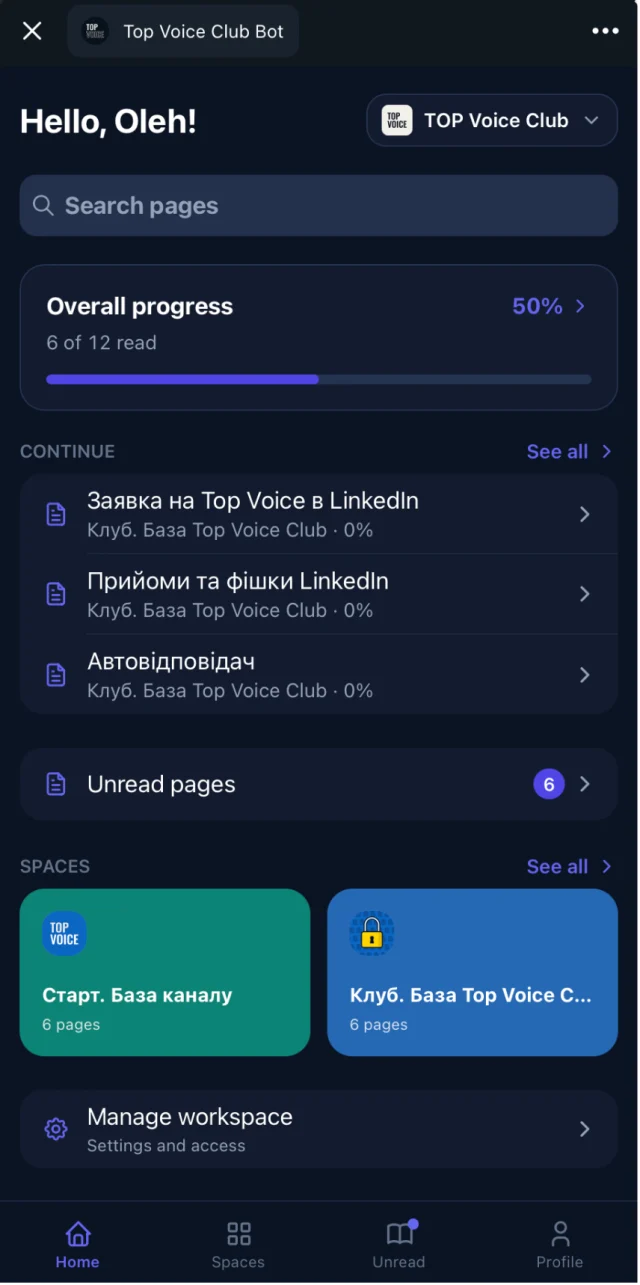
- Access follows the group: members of the connected Telegram group get access automatically, and lose it when they leave.
- Search across everything: full-text and semantic, so "how do I price a project" finds the page titled "Rate negotiation".
- Video with summaries: YouTube and Vimeo videos on the page, with a transcript and an AI summary.
- Google Docs sync: write in Google Docs and the page updates.
- Spaces and access groups: free and paid tiers, cohorts or mentors each see their part.
The Free plan is $0 with no time limit. Your own branded bot (white label) starts from $29/month on Basic. See pricing for Pro and Scale, or read more about the Telegram knowledge base.