 Download App
Notion
A flexible workspace for docs, wikis and projects. Members join as guests you invite and remove by hand.
Free, Plus $10/seat/mo (annual)
Plenty of paid clubs keep their wiki in Notion, and it works until the member list grows. If you're looking for a Notion alternative for communities that talk in Telegram, here is an honest look at where Notion wins, where it gets in the way, and what Embedify does differently.
A flexible workspace for docs, wikis and projects. Members join as guests you invite and remove by hand.
Free, Plus $10/seat/mo (annual) Embedify
A knowledge base that opens inside Telegram. Access follows your group membership automatically.
Free plan, own bot from $29/moNotion is a great place to write. The question for a community is a different one: how do 300 members find and read what you wrote, without you managing 300 guest invites?
Notion is a workspace. You write pages, nest them, link them, turn lists into databases and share the result with your team. Many communities start their wiki there because the founder already uses Notion for work.
For writing and organising, it's hard to beat. A Notion wiki can hold your rules, onboarding, meeting notes and resource lists, and it looks good while doing it.
Pages, sub-pages, databases, toggles and embeds. You can shape the wiki any way you like.
The same workspace holds your plans, tasks and drafts, so the team works and writes in one place.
One Plus seat with guests costs little. Price is rarely the reason people leave Notion.
So let's be fair from the start: Notion pricing is not the problem. The friction shows up somewhere else.
Notion was built for teams. A community is a different shape: hundreds of readers, a few writers, and people joining and leaving every week. Three things start to hurt.
Paid Notion plans allow unlimited guests, but each guest is invited and removed by hand. At 30 members that's a few minutes. At 300, it's a weekly chore, and it's easy to miss someone.
The usual result: people who left the club months ago can still open the wiki, and a new member waits a day for their invite because the admin was busy.
Your community talks in Telegram. The wiki lives in Notion. So a member taps a link, lands in a browser, gets asked to log in, and has to remember which email they used for their guest invite.
Some of them get there. Many go back to the chat and ask the question again.
Say a member wants the part of last Tuesday's call where the guest talked about pricing. In most wikis, the recording is a link on a page. The words inside the video aren't searchable, so the member scrubs through 90 minutes or gives up.
For a community, the hard part is rarely writing the wiki. It's getting the right people in, the wrong people out, and the answer in front of a member in under a minute.
Embedify is a knowledge base built for communities that live in Telegram. You get the same kind of clean, structured pages, and members read them without leaving the chat.
Connect your Telegram group, and its members get access automatically. When someone leaves the group, their access goes with them. No invites, no removals, no spreadsheet of who paid.
Need tiers? Spaces and access groups decide who sees what: free members, paid members, cohort A, cohort B or mentors only.
Members tap a button in the chat and the library opens right there. On the Basic plan and up, it opens from your own bot, under your community's name and avatar.
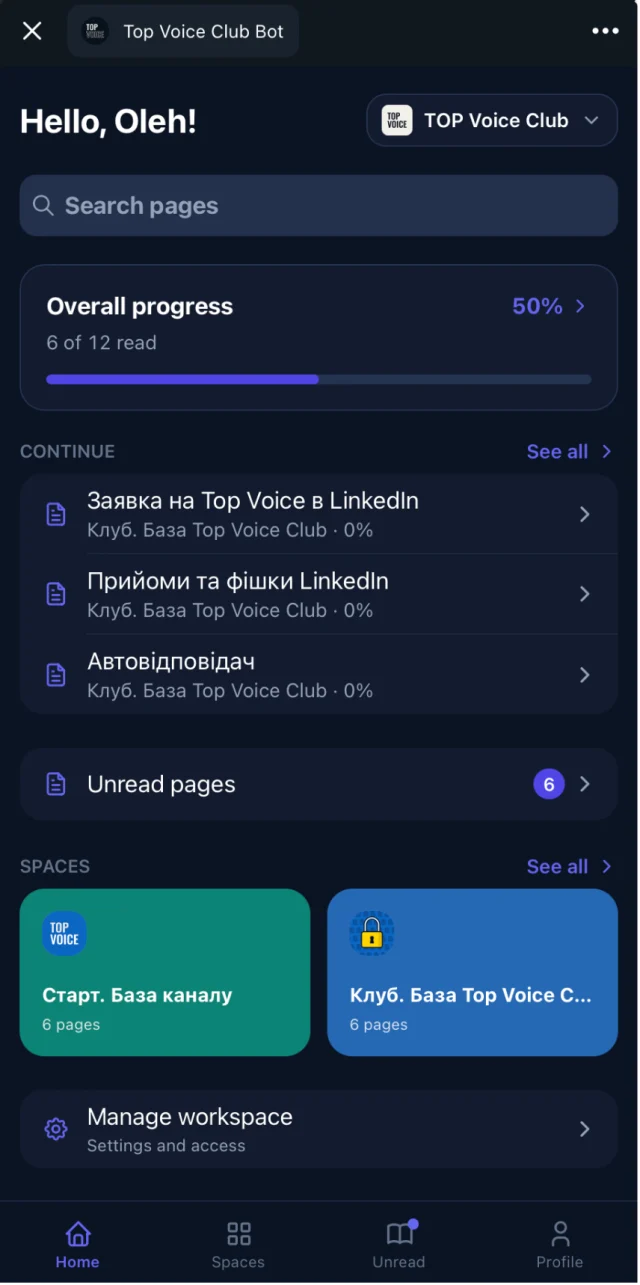
Embedify combines full-text and semantic search, so a member typing "how do I price a project" finds the page titled "Rate negotiation". YouTube and Vimeo videos on a page get a transcript and an AI summary, so the words spoken in a call are searchable too.
You don't have to give up your drafting habits. Import Google Docs and keep them in sync: edit the doc, and the page updates. Embedify doesn't import Notion pages directly, so the simple route is to keep drafts in Google Docs (or copy them over from Notion once) and publish to members through Embedify.
See who opened a page and who finished it.
Google Slides, PPTX and PDF decks shown right on the page.
Pasted text is cleaned into consistent headings, lists and spacing.
Telegram Mini App, web, iOS and Android, in English or Ukrainian.
| Notion | Embedify | |
|---|---|---|
| Built for | Teams that write, plan and work together | Communities that read and keep knowledge at hand |
| Where members read | Notion in a browser or the Notion app | Inside Telegram, plus web, iOS and Android |
| Member access | Guests invited and removed by hand | Automatic from Telegram group membership |
| Tiers and cohorts | Page-by-page sharing | Spaces and access groups |
| Video | Embeds | YouTube and Vimeo with transcript and AI summary |
| Search | Across your Notion pages | Full-text and semantic, including video transcripts |
| Price | Free; Plus $10/seat/mo annual ($12 monthly); Business $20/seat annual ($24 monthly) | Free plan; own bot from $29/mo; Pro and Scale on pricing |
Notion prices as published by Notion, checked in September to November 2026. Check Notion's pricing page for current plans.
if your team also uses it to work, plan and write, your member list is small and stable, and you don't mind inviting and removing guests yourself.
if your members already talk in Telegram, the list changes every month, and you want access to follow the group while members read without leaving the chat.
Or use both: keep drafting in Notion or Google Docs with your team, and publish the finished material to members through Embedify.
If you're comparing more apps like Notion for a community, see our guide to the best knowledge base software and the Telegram knowledge base page.
There is no direct Notion import. The practical route is Google Docs: copy your Notion pages into Google Docs (or keep drafting there), import them into Embedify, and they stay in sync when you edit the doc.
Notion has a Free plan, and paid plans start at $10 per seat a month on annual billing. Paid plans allow unlimited guests, so a community can run on one seat. Check Notion's pricing page for current limits.
You either invite each member as a guest by email, or publish the page to the web so anyone with the link can read it. The first means manual work every time someone joins or leaves; the second makes the content public.
Yes. Embedify has full-text and semantic search across the whole knowledge base, including transcripts of embedded YouTube and Vimeo videos and the text of slide decks.
If your members talk in Telegram, pick a tool that opens inside Telegram and ties access to group membership. Embedify does both, starting on a free plan with no time limit.
Start free and build your first knowledge base from your own materials. Add your own branded bot from $29/month.