
 Download App
How we picked and grouped the tools
Knowledge base software splits into jobs that look similar from far away. An internal knowledge base is written by a team for itself. A help center is written by a company for its customers. Documentation is written for developers or power users. A community knowledge base is built for members who mostly talk somewhere else.
Best for teams
Notion, Confluence, Slite. Internal wikis, onboarding, project notes.
Best for help centers
Zendesk, Document360, Help Scout. Public articles that cut support tickets.
Best for documentation
GitBook. Product and API docs with versioning and Git sync.
Best for Telegram communities
Embedify. A library that opens inside the group chat.
Best free
Notion Free, Google Docs, Telegraph for single posts.
For each tool you get what it does well, where it falls short, the starting price and a "pick it if". Prices were checked on vendor pages in November 2026.
Knowledge base software compared
| Tool | Best for | Free plan | Paid from | Where readers read it |
|---|---|---|---|---|
| Notion | Team wikis and docs | Yes | $10/seat/mo (Plus, annual) | Notion app or web |
| Confluence | Larger teams on Jira | Yes, up to 10 users | Per user, see Atlassian | Confluence web and app |
| Slite | Small teams that want answers fast | No (14-day trial) | $10/user/mo (annual) | Slite web and app |
| Zendesk | Help center tied to support tickets | No | $55/agent/mo (Suite Team, annual) | Public help center |
| Document360 | Large, structured help centers | No public plan | Quote-based | Public or private site |
| Help Scout | Small support teams | Yes, up to 5 users | $25/user/mo | Docs site |
| GitBook | Product and API documentation | Yes, 1 user | $65/site/mo (annual) | Docs site |
| Embedify | Communities that live in Telegram | Yes, no time limit | From $29/mo (Basic) | Inside Telegram, web, iOS, Android |
| Google Docs | Getting started at $0 | Yes | Free with a Google account | Google Docs |
| Telegraph | Single public posts | Yes | Free | telegra.ph pages |
Prices from each vendor's pricing page, checked between September and November 2026. Billing periods differ (per seat, per agent, per site), so check the vendor's page for current pricing.
Best knowledge base software for teams
Notion
Notion is a flexible workspace where a wiki, a task board and meeting notes live side by side. Teams love it because anyone can build a page in minutes, and databases turn a wiki into something closer to an app.
Pricing: Free; Plus $10 per seat per month on annual billing ($12 monthly); Business $20 annual ($24 monthly); Enterprise on request. The Free plan limits blocks for workspaces with 2 or more members, keeps 7 days of page history and caps uploads at 5 MB.
Where it falls short: it's a workspace, not a members' library. Guests are invited one by one and removed by hand, and there's no membership or gating.
Confluence
Confluence is Atlassian's wiki, and it's at its best next to Jira: specs link to tickets, templates keep pages consistent, and permissions scale to large companies. It's the default internal knowledge base in many engineering orgs.
Pricing: Free for up to 10 users. Paid plans are priced per user and the rate changes with team size, so check Atlassian's pricing page for your headcount.
Where it falls short: the editor feels heavier than Notion or Slite, and small teams often find it more than they need. That's why "Confluence alternatives" is a common search.
Slite
Slite is a team knowledge base built around finding answers. Pages are simple, and the Pro plan adds the Slite Agent and search across connected tools, which is the "AI knowledge base" idea in practice.
Pricing: Basic $10 per user per month and Pro $20, both billed yearly; Enterprise on request. There's no permanent free plan, only a 14-day trial.
Where it falls short: fewer building blocks than Notion, and no free tier to grow into.
Best for customer help centers
Zendesk
Zendesk's help center sits inside its customer service suite, so articles, tickets and the chat widget share one system. Customers can find an answer in the help center before they open a ticket.
Pricing: the help center comes with the Suite plans. Suite Team is $55 per agent per month on annual billing with 1 help center; Suite Professional is $115 with up to 5 help centers and 40+ languages. The cheaper Support Team plan doesn't include the help center.
Document360
Document360 is a dedicated knowledge base platform for help centers and internal docs, with workspaces, multiple languages and public, private or mixed access. AI features such as a chatbot are add-ons.
Pricing: quote-based. Document360 prices each setup by editor seats, workspaces, languages, SSO and privacy model, so see the vendor's pricing page.
Help Scout Docs
Help Scout is a support inbox with Docs built in. It's simpler than Zendesk and friendlier for small teams.
Pricing: a Free plan for up to 5 users includes 1 Docs site; Standard is $25 per user per month, Plus $45 and Pro $75, with a discount for annual billing. Extra Docs sites cost $20 per month.
Best for documentation
GitBook
GitBook is built for product and API documentation. Writers and developers can work in the editor or sync with Git, and readers get a clean docs site with search.
Pricing: Free for 1 user. Essential is $65 per site per month on annual billing ($79 monthly), Ultimate $249 ($299 monthly), plus $12 per extra user annual ($15 monthly). Paid plans include AI credits and a 14-day trial.
Where it falls short: it's shaped around docs, so it feels formal for a team wiki or a community library.
Best knowledge base software for communities in Telegram: Embedify
Embedify is the one we make, so read this with that in mind. It's built for one situation: a paid club, a professional community, a mastermind or an online school that talks in a Telegram group and keeps its materials somewhere else.
The usual setup is a Telegram chat plus Notion or Google Drive. Members leave the chat to find a recording, lose the link in pinned messages and ask again. Admins add and remove people in two places. Embedify puts the library inside Telegram instead.
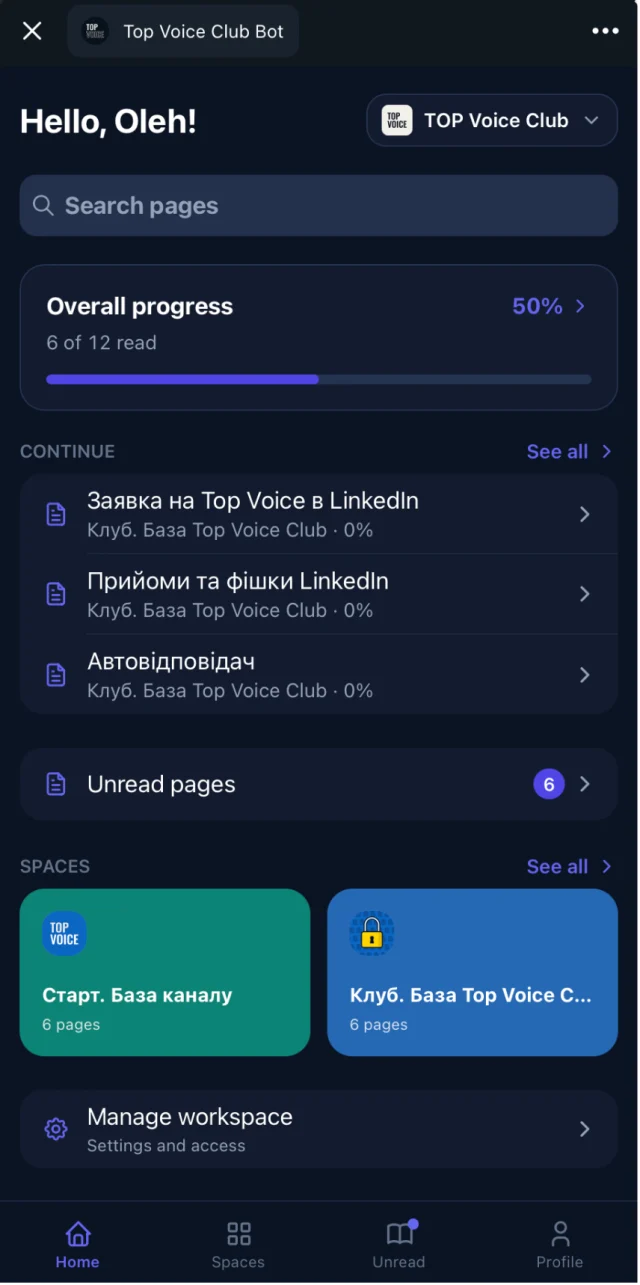
- Opens inside Telegram as a Mini App. Members tap a button in the chat; there's no new account to create.
- Access follows the group. Members of the connected Telegram group get access automatically, and lose it when they leave.
- Spaces and access groups split content by audience: free and paid tiers, cohort A and cohort B, mentors only.
- Search combines full-text and semantic search, so "how do I price a project" finds the page titled "Rate negotiation".
- Video with transcript and AI summary for YouTube and Vimeo, so a 90-minute call can be skimmed in 2 minutes.
- Google Docs sync: import a doc, keep editing it in Google Docs, and the page updates.
- Reading progress: admins see who opened and who finished each page.
Pricing: the Free plan has no time limit and covers open content with unlimited readers. Basic, with private access for up to 300 members and your own branded bot, starts from $29/month. For Pro and Scale, see pricing.
Where it falls short: Embedify isn't a team wiki with databases, a ticketing help center or an API docs tool. If your readers aren't in Telegram, another tool on this list will fit better.
Why a community knowledge base is a different job
Most knowledge base software assumes the reader is an employee or a customer. A community is neither. Members pay, or join for free, and spend their time in a chat. They didn't sign up to learn a new tool, and they leave the community when they stop finding value.
Team or help center knowledge base
- Readers have a work account or arrive from Google
- Access is managed by IT or is public
- Content is mostly written articles
- Success means fewer tickets or faster onboarding
Community knowledge base
- Readers are in a group chat on their phone
- Access should follow membership, and change every week
- Content is mostly recordings, decks and member answers
- Success means members find last Tuesday's session without asking
That's why a tool can be the best knowledge base software for a company and still fail a community. If your members talk in Telegram, the shortest path wins: the library opens from the chat, the login is the Telegram account, and leaving the group closes the door. Our community knowledge base guide covers what to put in it first.
Best free knowledge base software
Free knowledge base software is fine for a start, as long as you know where each option stops.
Notion Free
A real wiki for one person or a small team. Block limits apply once 2 or more members join, and page history is 7 days.
Google Docs
Free with a Google account, and everyone knows it. Works for a handful of documents; with 50 it becomes a folder hunt with no shared search for readers.
Telegraph
Free, anonymous one-page publishing by Telegram. Great for a single long post. No search across pages, no access control, no structure.
Embedify Free
Open content with unlimited readers inside Telegram, with no time limit. Private access starts on Basic.
If you're outgrowing Telegraph posts, our Telegraph vs Embedify page compares the two in detail.
How to choose knowledge base software: 5 questions
Who reads it?
Your team, your customers, developers or members of a community. This one answer removes most of the list.
Where are those readers already?
Support customers arrive from Google. Teams sit in Slack or Jira. Communities sit in a chat. Pick the tool that meets readers where they are.
Who controls access, and how?
Public, per-seat, per-guest or tied to group membership. Count how many people you'll add and remove each month by hand.
What content do you have?
Text only, or also recordings and decks. If most of your knowledge is in video, look for transcripts and summaries.
How will the price grow?
Per seat, per agent and per site pricing behave very differently at 10 people and at 500. Model the bill at twice your current size.
The best knowledge base is the one people actually open. A tool your readers have to leave their day to reach will lose to one that sits where they already are.
Notion alternatives and Confluence alternatives in short
Many people searching for knowledge base tools are really looking to leave Notion or Confluence. Here is the short version.
| If you're leaving | Because | Look at |
|---|---|---|
| Confluence | It feels heavy for a small team | Slite, Notion |
| Notion | You want answers, not a workspace to build | Slite |
| Notion | You publish product docs | GitBook |
| Notion or Google Drive | Your readers are a Telegram community | Embedify |
| A wiki | Customers need a help center | Zendesk, Help Scout, Document360 |
For the community case in depth, read Notion vs Embedify and what a knowledge base is.